


- Niche down
- Create videos on topics people are searching for
- Improve your video’s ranking on Google
- Increase your click-through rate with a compelling title
- Create eye-catching video thumbnails
- Write an engaging description
- Get more suggested views by leveraging series playlists
- Embed your video links on high-traffic forums
- Embed your video links in relevant blog posts
- Use end screens and cards
- Highlight key moments on Google by adding timestamps to the timeline
- Publish videos at the best time for your audience to watch
- Add relevant YouTube tags
- Get more views with YouTube search ads
Niche down
YouTube monetizes through ads. Therefore, it’s in their best interest to keep people on their platform for as long as possible so they can display more ads.
This is why they recommend similar videos in the right-hand sidebar.
For example, if you watch a video on how to cook short ribs, most of the right-hand sidebar recommendations will be steak recipes and similar preparations for other cuts of beef.
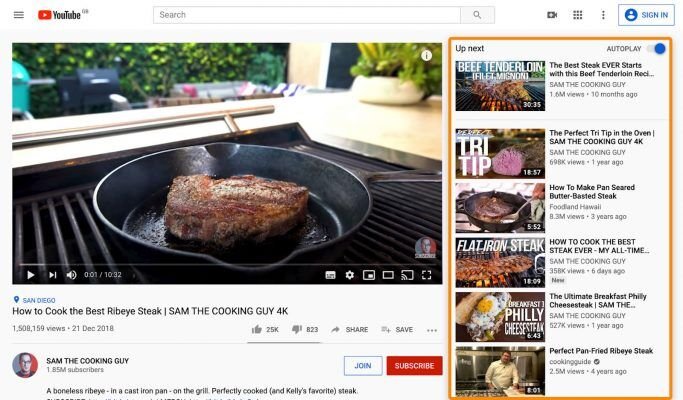
This makes perfect sense.
If you’re already interested in learning how to cook short ribs, you might also be interested in learning how to make a delicious Philly cheesesteak!
But what you might notice in the screenshot is that many of the recommended videos come from the same channel.
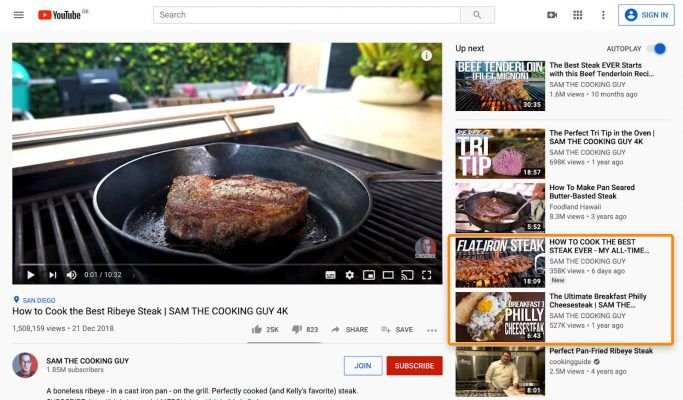
This is a crucial point because one of the easiest ways to get more views is to have viewers watch more than one of your videos. So, you’ll want to appear in this position.
But how do you achieve that?
While it’s impossible to guarantee your video will appear in a specific spot, you can increase your chances by creating related videos on your channel. That’s why it’s worth it to maintain a niche when you’re just starting out.
So, don’t just start a cooking channel. That’s too broad. Instead, start a channel about grilled meats or BBQ. This will increase your chances of being recommended in the right-hand sidebar of your own videos, which is how you’ll attract more views to your channel.
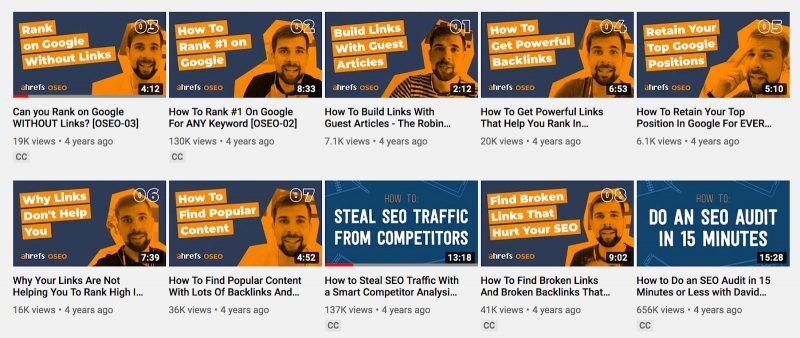
This is exactly what we did. Our first videos in 2015 focused solely on link building and search engine optimization (SEO):
Of course, you don’t have to keep your video content focus narrow forever.
Once you’ve attracted more views, you’ll get more subscribers. Because they’ll pay more attention to your channel’s videos regardless of the topic, you can then broaden your content a bit. For example, maybe you want to branch out and create videos about marinades or side dishes.
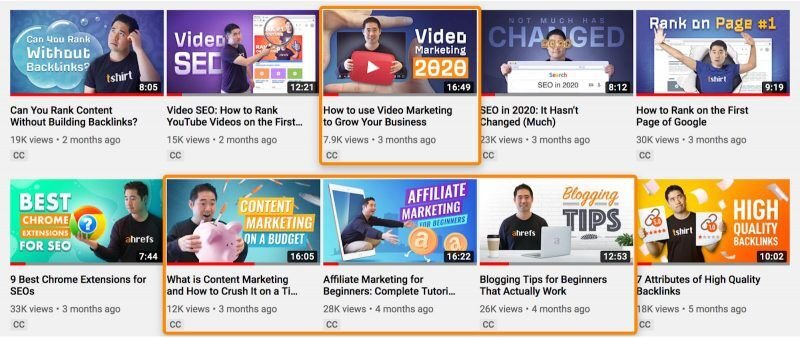
And this is what we did. While we still primarily focus on SEO, we’ve also started producing videos on related topics like blogging, content marketing, video marketing, and affiliate marketing:
Create videos on topics people are searching for
One of the biggest mistakes new video content creators make is producing videos that are too self-focused, for example, ‘the camera I use to film’.
Unless you have a massive following like iJustine, the sad truth is that nobody cares who you are or what you do.
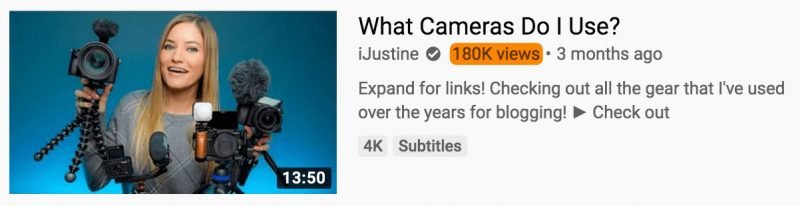
So, a better way to start your YouTube channel is to target topics with high search traffic potential. You see, while people might not care about the gear you’re using, they are still looking for advice on camera equipment.
In fact, the query ‘best camera for YouTube’ gets about 3,400 monthly searches in the US and 6,100 monthly searches globally.
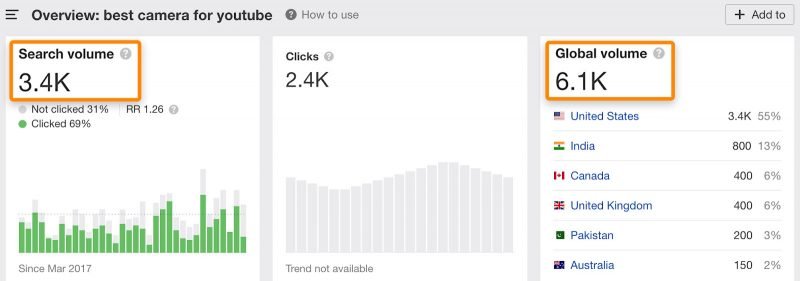
So, if you target topics with high search traffic potential and try to rank for them on YouTube, you can attract many views to your videos. This is achievable even if you have no subscribers.
How do you find these topics?
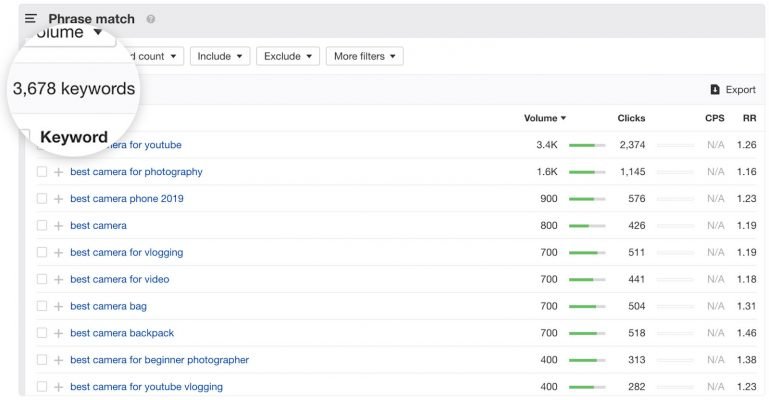
The easiest way is to use Ahrefs’ free YouTube Keyword tool.
Just enter any relevant word or phrase, and it will show you up to 150 keywords and their monthly search volumes.

Use Ahrefs’ Keywords Explorer to explore all video content ideas from our database of over 800 million YouTube keywords.
Improve your video’s ranking on Google
Here’s an interesting fact:
Google has driven over 230,000 views to our YouTube videos in the past 12 months.
How did we achieve that? Because YouTube videos sometimes appear on Google.
For example, look at the search results for ‘how to make scrambled eggs’. Google displays a carousel of YouTube videos in the search results.

But the question is, how can you find video topics with the potential to gain traffic from Google’s suggestions?
It’s simple! Look for videos that have already received traffic from Google’s suggestions and create videos on similar topics. You can do this with Ahrefs’ Content Explorer, a database that allows users to search for information on over a billion web pages, complete with full SEO metrics.
You should try starting by running this search: site:youtube.com inurl: watch title:topic

For example, the Amritsari Chole Masala recipe video is estimated to generate 1,900 monthly search visits. Not bad, right?
Once you’ve found a list of topics worth targeting, the next step is to create an ‘optimized’ YouTube video that is likely to rank on Google.
So, how do you do that?
Read more in this post!
Increase your video’s click-through rate with a compelling title
No matter how high your video ranks, you won’t get any views if no one clicks on it.
That’s why you need a compelling title to entice viewers to click on your video.
Now, this doesn’t mean you should create clickbait like ‘This tip will get you 15 million views in 1 hour’. While that might drive clicks, it’s unlikely you’ll be able to deliver on the title’s promise to your audience, and that will reduce your YouTube channel’s credibility.
So, how do you write better YouTube titles? Here are some tips:
- Include your main keywords in the title. Briggsby’s research shows that there are several benefits to having your target keywords in the title. This also aligns with YouTube’s advice that video titles should include search phrases relevant to the content.
- Keep titles concise. YouTube often automatically truncates overly long titles. Keeping titles as short as possible also helps ensure your video description isn’t cut off.
- Focus on the viewer’s benefit. Your title should clearly explain why someone should watch your video over any other.

Create eye-catching video thumbnails
Improving your CTR isn’t just about a compelling title. You also need to create an eye-catching video thumbnail.
For example, take a look at the thumbnails on our channel:

We intentionally designed them to stand out to viewers!
Here are some tips for creating video thumbnails that entice searchers to click:
Don’t choose a static image from your video. It’s often unappealing and lacks relevance. Instead, design a unique and captivating visual version to grab searchers’ attention.
Use a relevant image. Make sure your thumbnail visually demonstrates that the video offers a solution to the user’s query. For example, a tutorial video on how to tie a tie should probably feature an image of someone tying a tie in the YouTube thumbnail.
Use contrasting colors to your video’s advantage. YouTube’s background colors are primarily white, gray, and red. Avoid using these colors when designing your video’s thumbnail image, as they will blend in with other search results.
Use descriptive text on the video thumbnail. We often add something short to complement the video’s meaning for the title. For example, our video about learning SEO will have ‘Learn SEO’ directly on the thumbnail.

You can succeed with a good description
It’s not just the title and thumbnail that appear in YouTube search results for your video. The first sentence of your video description is also important for attracting viewers.
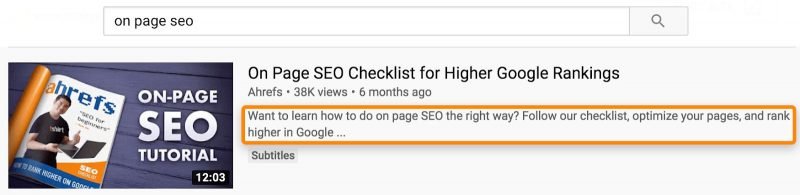
Since this can potentially affect CTR, you should try to make the video caption as engaging as possible.
That said, the first few lines are always considered the most important, so don’t neglect your video description. This is a great place to encourage viewers to click on more of your videos, subscribe to your channel, or more.
Here’s the description from a video we produced about SEO in 2020:
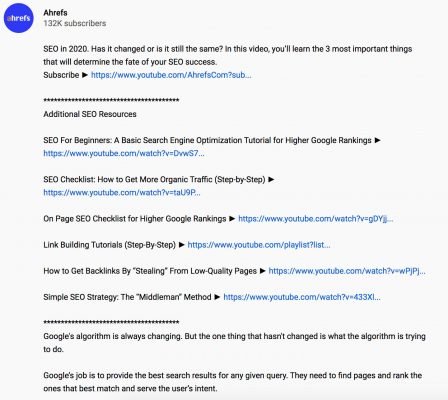
We used the same general formula for all our descriptions:
1-2 enticing descriptive sentences to draw viewers to click on the video;
Link to subscribe to the channel (You just need to add ?sub_confirmation=1 to your channel URL to create a subscribe link);
- Links to related YouTube videos on our channel;
- Long video description (we try to keep the word count between 500 – 1,000 words);
- Timestamps for key moments in the video (see tip #11);
- Another link to subscribe to the channel;
- Links to our social media pages.
Easy peasy!
Here’s a basic template if you want to adopt our writing style.
[Insert a short and enticing 1-2 line description of your video]
Subscribe ► [Insert channel URL]?sub_confirmation=1
***************************************
Additional Resources
[Insert links to a handful of related videos from your channel]
***************************************
[Insert a 500 – 1,000 words description]
Timestamps:
[Insert timestamps here – where appropriate]
Subscribe ► [Insert channel URL]?sub_confirmation=1
Homepage ► [Insert link to homepage]
Facebook ► [Insert link to Facebook page]
Twitter ► [Insert link to Twitter profile]
Instagram ► [Insert link to Instagram profile]
LinkedIn ► [Insert link to LinkedIn page]
Get more suggested views on YouTube by leveraging series playlists
Suggested views occur when someone decides to click on your video in the right-hand sidebar.
We’ve talked about how you can increase your video’s chances of appearing in the suggested sidebar. But there are two parts to it, and the part we haven’t covered yet is the ‘Up Next’ section:
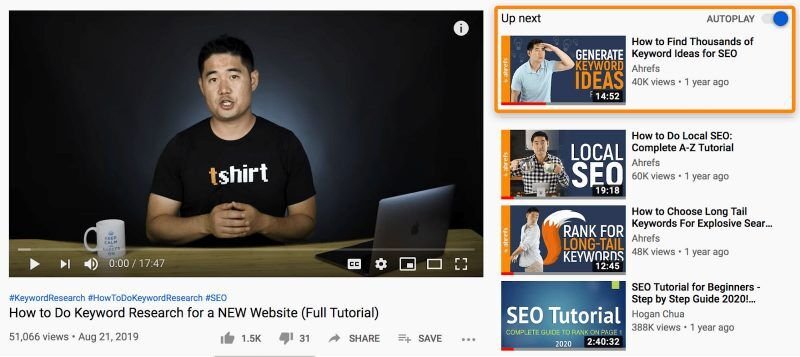
And this is something you definitely want to achieve!
The reason is simple: the next video will automatically play after the current one ends.
But here’s the problem: if you’re a small or new channel, it will be very difficult to get suggested video views by YouTube. So, if you’re just starting out, you need to make sure you’re capturing the ‘Up Next’ position for your own videos.
How? Use a series playlist.
Series playlists allow you to mark your playlist as an official set of videos that you want to be watched consecutively.
Think about how Netflix does it with seasons and episodes of your favorite shows. Watching videos out of episode order wouldn’t make much sense to viewers.
To set up this type of series playlist, go to your playlist, click on “playlist settings”, then “advanced settings”, and select “set as official series for this playlist.”.
For best results, you should arrange your videos in a logical order. This will increase the chances of your video ranking higher in the ‘Up Next’ position after the current video, and users actually have a habit of watching videos in a set order.
Embed your video links on high-traffic forums
People often ask questions on forums and Q&A websites that your videos can answer for them.
For example, here’s a user’s question on Quora, and one of our YouTube videos could help answer it, so we embedded its link when replying to the thread:

However, the trick to making this tactic work effectively is not to answer any and all user questions. Instead, look for topics related to your videos with consistent traffic from Google and answer those.
You can do this with Ahrefs’ Site Explorer.
Just paste the URL of a popular forum like Quora or a well-known industry forum like WarriorForum, then go to ‘Top Pages’ to see the topics that get the most search traffic.
Here’s what Quora’s report would look like:
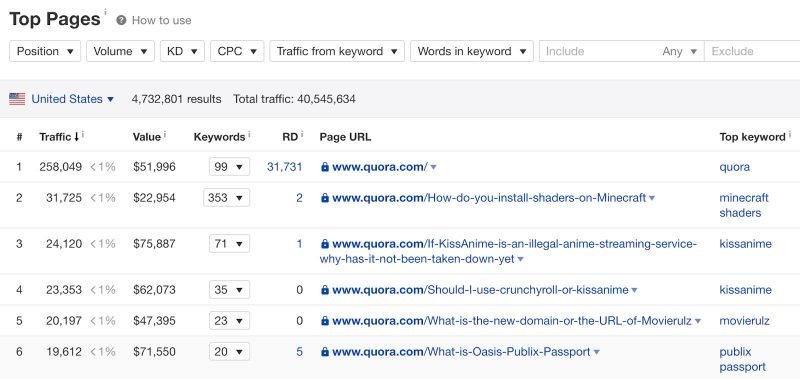
Read through the reports for questions related to videos you might want to answer.
Let’s assume the question ‘best way to replace eggs in cornbread recipe’ looks promising. The final step is to click the caret, hit ‘Overview’, then go to the ‘Organic search’ tab, to see the page’s organic traffic statistics over time.
What you want to see is a consistent stream of organic traffic month-over-month like this:
These will be the most worthwhile questions to answer because the probability of them bringing consistent organic views to your channel is very high.

Embed your video links in relevant blog posts
Our post on affiliate marketing is estimated to generate about 12,000 monthly search visits.

And because we have a video on this topic, we embedded its link in related articles, which has brought us an additional 2,553 views to date.
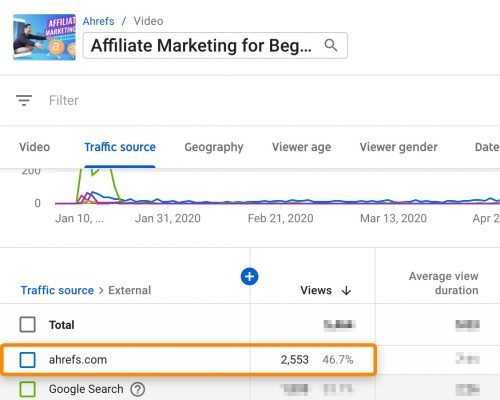
Pretty cool, right?
So, the case is clear: if you have a blog post, you should embed your video link in relevant blog posts.
How can you identify which pages to embed your video links on?
The easiest way is to use the conventional method. If you have a video on the same topic as one of your blog posts, then you should embed the video link.
Another option is to look for high-traffic pages that could drive views to your YouTube videos in Google Analytics or Google Search Console.
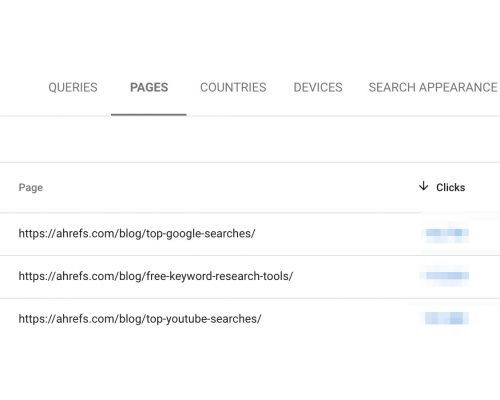
If you don’t have Google Analytics or Google Search Console installed, you can also enter your domain into Ahrefs’ Site Explorer and view the top-ranking pages report to filter for pages with organic traffic.

On the other hand, cards are slides you can add at any point in your video while it’s playing.
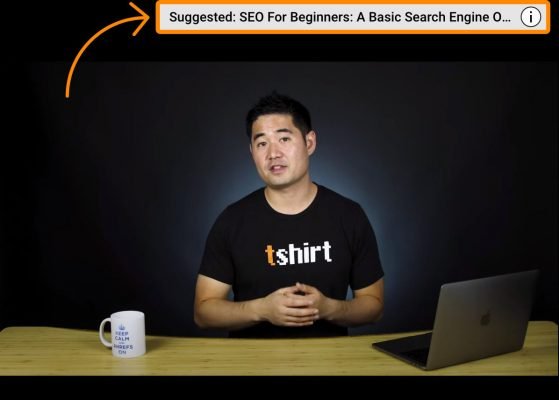
You can use these to recommend other videos and playlists, or to add surveys or links to another website.
Now, while it might sound tempting to always link to your website and send traffic there, it’s often better to keep users on the YouTube platform.
In our experience, the cumulative value you get from user watch time is even higher than link clicks.
If you’re not adding end screens and cards to your videos, you should start doing so. It doesn’t take much time, and using this trick has added tens of thousands of views to our videos.
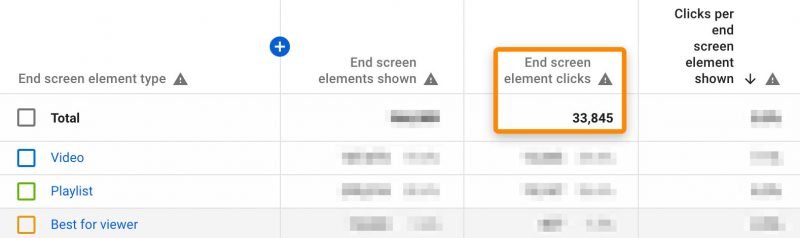 Endscreen click-through results from viewers
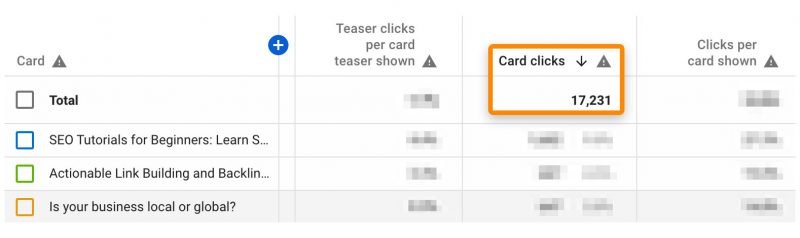 Card click-through results from viewers
Highlight “key moments” of your video on Google by adding timestamps
Google sometimes displays “key moments” of videos in search results:
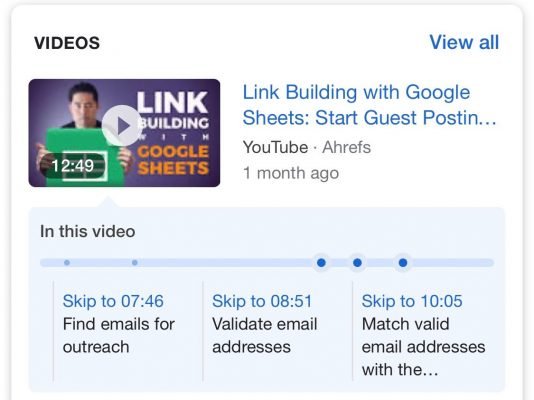
Key moments in videos allow searchers to skip less important points and go straight to the crucial part they want to watch.
Currently, Google will often display these “key moments” for your videos if you add timestamps and labels to your YouTube channel description.
Timestamps are where you mark a specific part of the video content in the format [hour]:[minute]:[second]. And labels are used to briefly and clearly describe the marked sections.
SIDENOTE: You can omit [hour] if not necessary.
Here’s how to add them to your video’s timeline:
For example, take a look at the timestamps and descriptive labels on our YouTube video.
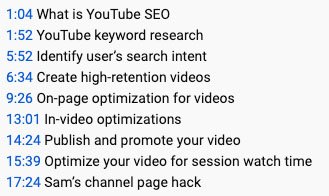
These timestamps take viewers to specific parts of the video. For example, clicking on 13:01 will take you to the section describing how to optimize videos.
And it seems these optimization methods are working well. Google is now displaying “key moments” for our videos for the query “how to rank YouTube videos”.
Here are some tips for adding timestamps and descriptive labels to your videos:
- Place each timestamp on a new line and include the label on the same line.
- List timestamps in chronological order. For instance, don’t list 15:24 before 11:33.
- Keep labels concise but highly descriptive. Google often truncates long descriptions. So, just state the content of that section directly; don’t try to stuff too many keywords into it.
- Align the on-screen content with the label. If your label says ‘chopping onions’, try to align the timestamp with when you clearly see onions being chopped on screen.
Publish videos at the best time for your audience
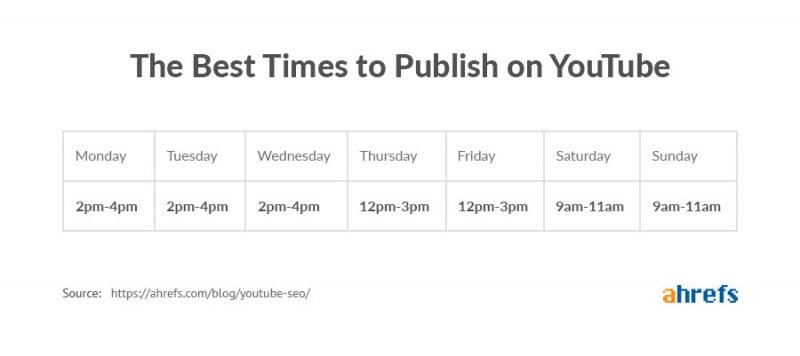
The best time to publish is when your target audience is most likely to watch videos on YouTube. You can identify peak viewership times by checking the latest “When your viewers are on YouTube” report on this page.

SIDENOTE: This report is brand new and still considered experimental by YouTube.
Now, what we recommend here is to publish about an hour before peak viewership, rather than publishing right at the peak. This gives viewers more time to discover and watch our videos, leading to more views.
For example, a good time to publish our videos would be around 8-9 PM Singapore time (or 8-9 AM EST).
If you don’t get enough daily views for this report to be effective for your videos, you can try following these general timeframes, with the help of Frederator Networks.
Add relevant YouTube tags
Evidence suggests that YouTube tags aren’t critically important. But since it only takes a few seconds to fill them in, it’s worth adding them even if they only help a small number of viewers find your videos more easily.
Here’s the 3-step process we use at Ahrefs:
First, set one tag as your main keyword.
YouTube’s official guidance for tags is to ‘use words and phrases that are most meaningful to your video’, so it’s obvious to start with your main keyword.
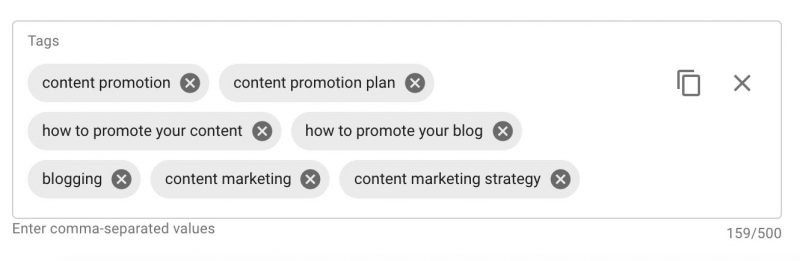
For example, if we were to add a tag for our video on content promotion, it would be ‘content promotion’.

Second, add popular keywords to the video, which should be related to top-ranking videos.
You can use browser extensions like vidIQ and TubeBuddy for assistance. Just install one of the tools above, search for your target keyword on YouTube, open the top 3-5 most relevant videos, and look for popular and relevant tags that these videos use.
For example, we saw tags like ‘Content promotion plan’, ‘How to promote your content’, and ‘How to promote your blog’ appearing for all highly competitive content promotion videos, so we decided to add those keywords to our video.

Third, add keywords related to YouTube search volume.
The easiest way to do this is to paste the tags obtained from the previous steps into Ahrefs’ Keywords Explorer with the search engine set to YouTube. Filter through the list for those relevant to search volume.
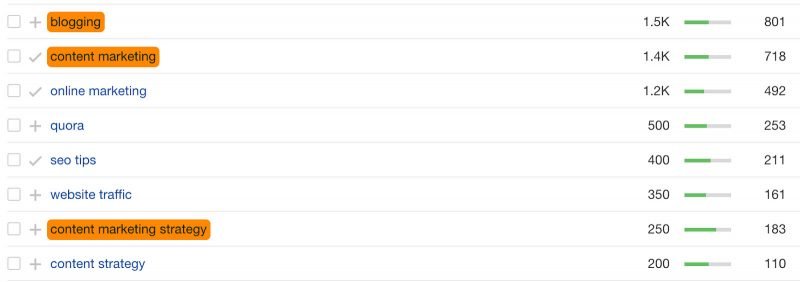
In this case, blog posts, content marketing, and content marketing strategy could be relevant to the video, so we added them to our video:
You can get more views with YouTube search ads
If you have a budget, the best way to get more views for your video is to pay for it. And you can do that by using YouTube’s advertising program.
In fact, this is something we’ve been experimenting with for a while. We do this by targeting YouTube keywords that have generated high watch time for us.
The reason is simple: we don’t need fleeting views. What we want are lasting views.
When these videos generate high watch time, it means someone who initially stumbled upon it through a YouTube ad is likely to watch the entire video. And these people might even decide to watch more of our videos because they liked the first one.
To get started, go to the ‘Traffic source’ report in your YouTube analytics and click on the YouTube search section.
Here, you’ll see a report on the keywords that have driven viewers to your videos and the average watch time for these videos.
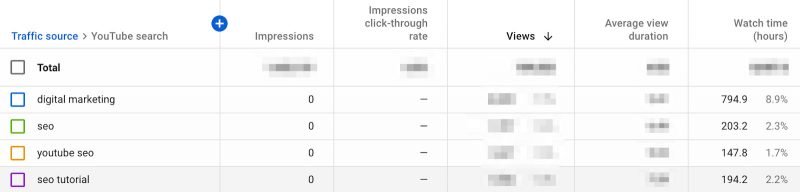
As you can see, the keywords ‘SEO’ and ‘SEO tutorial’ are generating excellent watch time for our YouTube channel. So, we created an ad targeting these keywords.

At $0.07 per view, this is also a cost-effective way for your channel to get more views.
Conclusion
Don’t forget, you can also leverage your existing resources outside of YouTube. If you have a large email list or a substantial social media audience, make sure you share your videos with them.
And finally, ask your viewers to like and share your videos. Yes, this might feel a bit overused, but there’s no harm in adding a note outside your video about this.
Just don’t spam this too much every minute of the video.


