

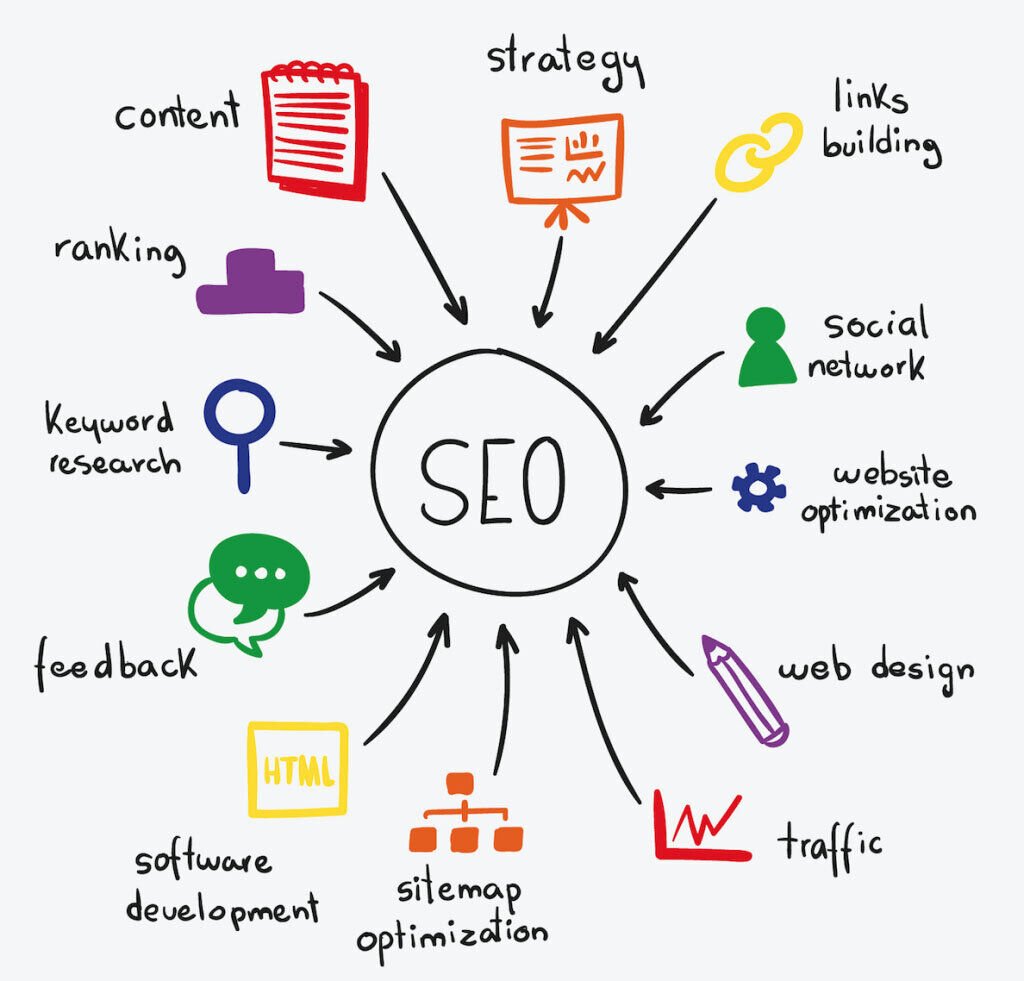
Do you feel like SEO is too difficult and not worth the effort?
SEO isn’t complicated. It’s quite simple, or at least the basics are. But the basics aren’t enough to get you higher rankings, right?
That’s completely wrong.
Here’s the truth:
Most people running websites have fairly limited knowledge about SEO, so you often only need to get the basics right to succeed.
In this post, you’ll learn five basic steps to succeed in SEO:
- How to find out what your customers are searching for
- How to optimize your web pages for your target keywords
- How to ensure your website is accessible to both search engines and humans
- How to get other websites to link to your website
- How to start measuring your SEO success
STEP 1: Find Out What Your Customers Are Actually Searching For
You can’t optimize your website without knowing what your customers are searching for, and that’s obvious.
How do you find this out? The best starting point is to observe general search trends.
Imagine that you run a hotel in Dublin, Ireland. It doesn’t take an SEO genius to guess that your customers might be searching for things like:
- Hotels in Dublin
- Places to stay in Dublin
- Accommodation in Dublin
Before you do anything else, think about what your customers might be searching for and write down your ideas in a notebook. You can even ask them directly.
No need to dig too deep here, a few ideas are enough!
Got it? Good! Let’s research some more.
Find Out the Most Popular Way People Search for Your Business
It’s likely that some customers are searching for your business using the words and phrases you’ve written down. However, for most people, it could be a different story.
So, the first step is to find out the most popular way people search for what you do.
You can use the ideas you’ve written down to do this. Start by doing a Google search for one of the words or phrases on your list. It doesn’t matter how ridiculous or long-winded this phrase is. I’ll use an intentionally silly one to demonstrate.

Here are some of the top search results for that query:
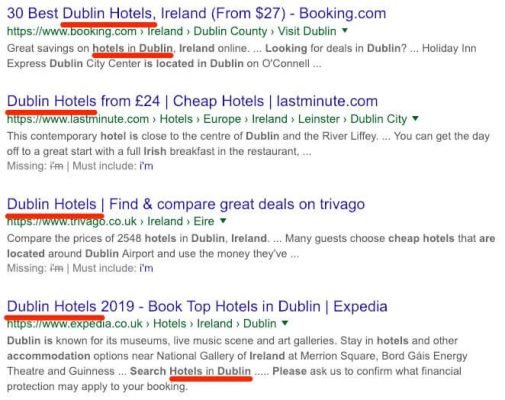
After glancing at all these results for 10 seconds, I can see they all have the phrase “Dublin hotels” in the title.
This is important because websites tend to optimize their title tags for SEO purposes, so it’s very likely that these people have done some research and found that “Dublin hotels” is the most popular way people search for a place to stay in Dublin.
But don’t let this get ahead of yourself.
There’s no guarantee that these people know what they’re doing.
Make sure this is a good primary keyword to target by checking our original search term in Ahrefs Keywords Explorer.
Ahrefs Keywords Explorer report for “Dublin hotels”Bingo!! When we search the same phrase in Ahrefs Keywords Explorer, it tells us the Parent topic is “Dublin hotels” with a monthly search volume in the US of 9,900. It also has good traffic potential.
This confirms our initial suspicions that this is a good primary keyword to target.
Learn Other Ways People Search for the Same Thing
Let’s look at the SERP Overview report for “Dublin hotels” queries in Ahrefs Keywords Explorer.
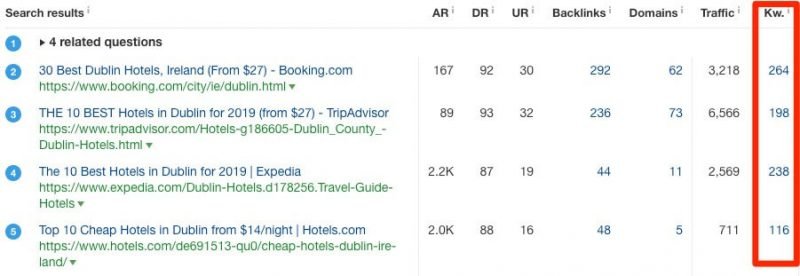
SERP overview report for “Dublin hotels” at AhrefsNote the information in the “Kw” column, which tells us how many keywords each of the top 10 websites is ranking for.
The average here is around 150-200 keywords.
In other words, each of these websites gets traffic from hundreds of long-tail keywords and other related keywords. This means not everyone types “Dublin hotels” into Google when looking for a place to stay in Dublin. Other people have searched for the same thing in different ways.
You can start to understand what these other keywords are by further analyzing Google’s search results.
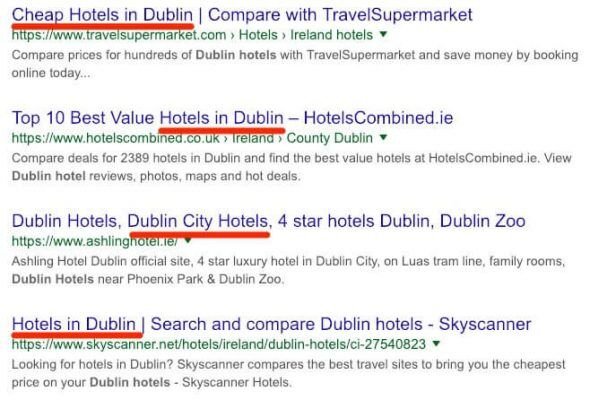
Look for similar and related phrases that appear multiple times on the search page.
In this case, we see phrases like “hotels in Dublin,” “Dublin city hotels,” and “cheap hotels in Dublin.”
These businesses may have already identified these keywords and phrases, which is why they’ve included them in their title tags.
If you want even more suggestions, try checking out the Also rank for report in Ahrefs Keywords Explorer.
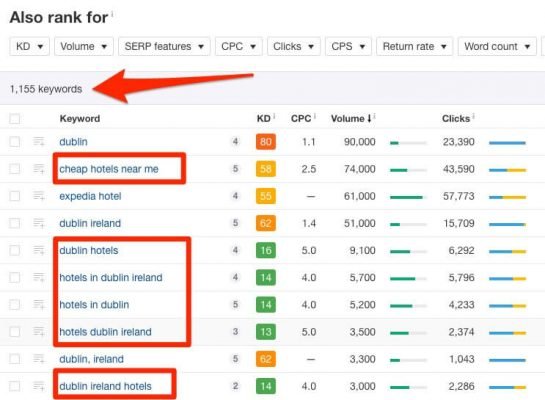
This report shows keywords that the top 10 ranking pages are also trying to rank for.
However, this report tends to show a lot of keywords, which can be overwhelming for you.
One way to narrow things down to only super-relevant results is to take the 2-3 most relevant top-ranking pages and paste them into the Ahrefs Content Gap tool. This will reveal the common keywords that all those pages are ranking for.
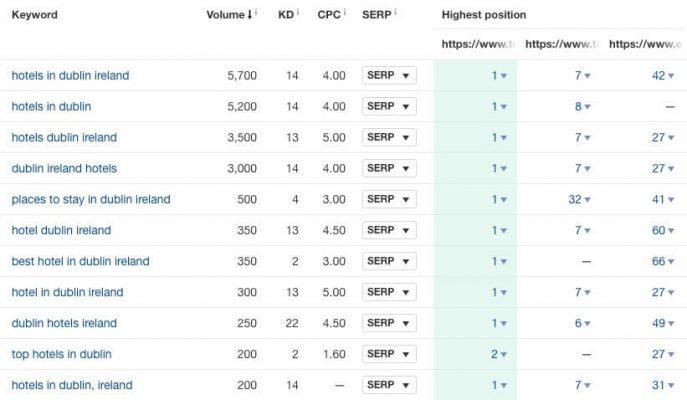
Dig Deeper Into More Specific Searches Your Customers Are Making
Now that you know how people search for your business, it’s time to dig deeper into more specific searches people might make related to what you’re doing.
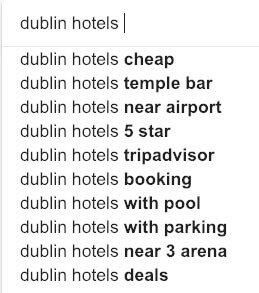
A simple way to start is to look at Google’s autocomplete results.
Go to Google and start typing a query into the search box, but don’t press Enter. Google will immediately suggest some additional search terms that people have used:
You can repeat this step and get more results by adding each letter of the alphabet:
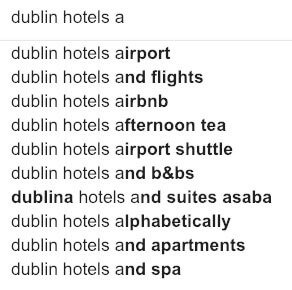
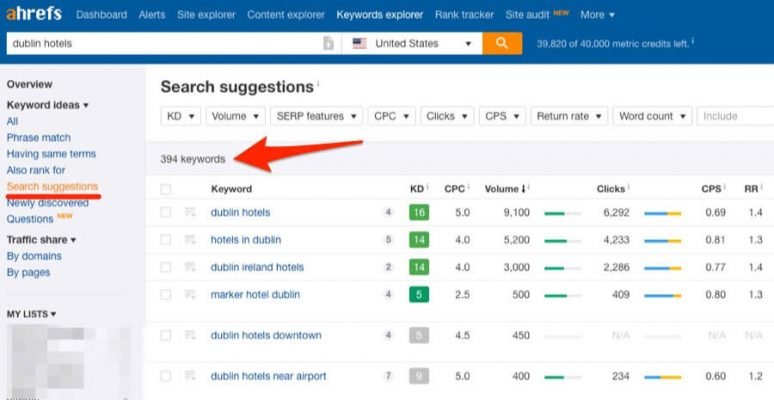
If this sounds tedious, go to Ahrefs Keywords Explorer and check the Search suggestions report. This report effectively automates the process and displays a list of Google autocomplete keywords along with valuable SEO metrics like monthly search volume and Keyword Difficulty.
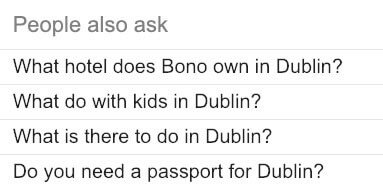
If you’re interested in finding out the questions people ask (and search for), check the “People also ask” section in Google’s search results.
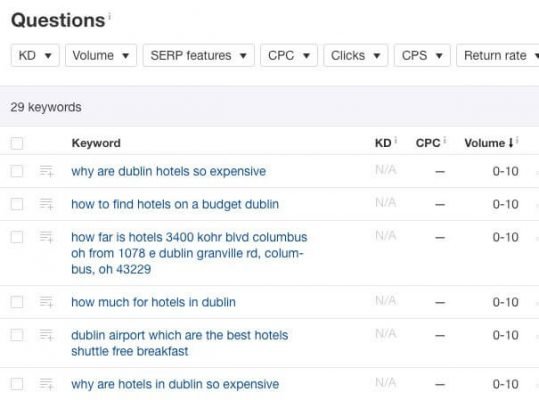
Or check the Question report in Ahrefs Keywords Explorer:
Find Popular and Engaging Topics in Your Field
Content marketing is the art of creating useful and valuable content to attract your customers or target audience. But don’t just start a blog and sit there hoping the best people find the popular and engaging topics in your field and create content related to the topics you’ve discussed.
For this, I’d recommend starting with Reddit.
Find a subreddit related to your industry (e.g., r/irishtourism). Then, look at what people are talking about and which topics are most popular. You can even filter and sort by top topics of all time.
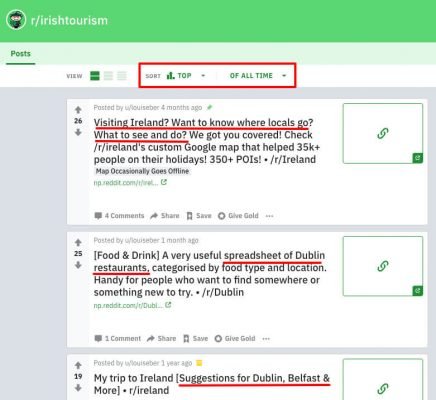
For r/irishtourism, guides and resources about things to do and places to eat are very popular with those interested in tourism in Dublin.
Want to take things a step further?
Check out the Content Explorer tool.
Content Explorer provides one of the fastest and most reliable methods for finding the most popular and relevant content in a given field.
Here’s what I got when searching for ‘Ireland travel’:
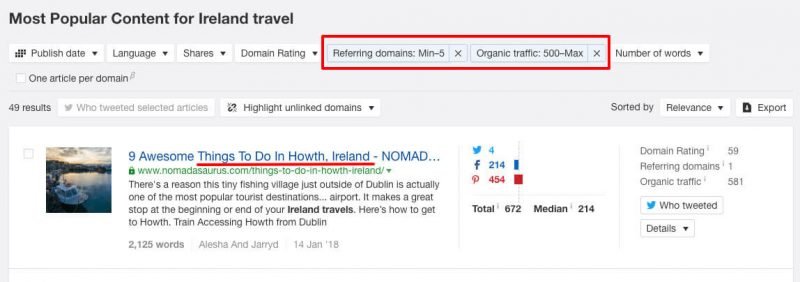
Notice how I used filters to find pages with significant search traffic, even though they only have a few links? This allows me to quickly identify popular related topics that are easy to rank for.
I can even see the keywords each of these pages ranks for by clicking on the desired item and dropping down the “Details” section.
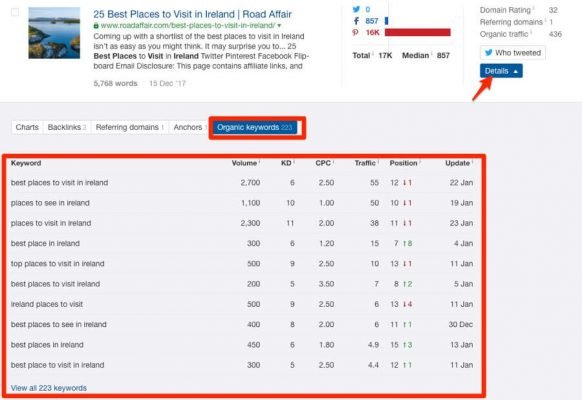
It seems travel tips are quite popular. This gives me the idea that we could publish a travel guide to attract visitors and social shares.
Expand Your Keyword List by Searching Elsewhere
Google search results and professional keyword tools can give you a lot to start with, but it’s never enough.
To succeed with SEO, you need to understand how people talk about the field you’re operating in, the problems they face, etc. Take every opportunity to talk to customers and pay attention to the language they use.
Doing this is great, but it’s also very time-consuming.
So, here are a few places where you can find the words people use when talking about your topic of interest:
- Forums: There are quite a few communities where people discuss travel. For example, a simple search led me to the TripAdvisor Dublin Travel Forum.
- Quora/Reddit: Quora probably isn’t the first place you think of when looking for travel advice, but I was surprised by the amount of information that can be found there even on this topic. Speaking of Reddit, the saying that there’s a subreddit for everything is generally true.
- Facebook/LinkedIn Groups: LinkedIn leans more toward the B2B market, but when it comes to Facebook, there are groups for almost every field.
Any website or social network with a large number of visitors and user-generated content can serve as a source of inspiration and keyword ideas.
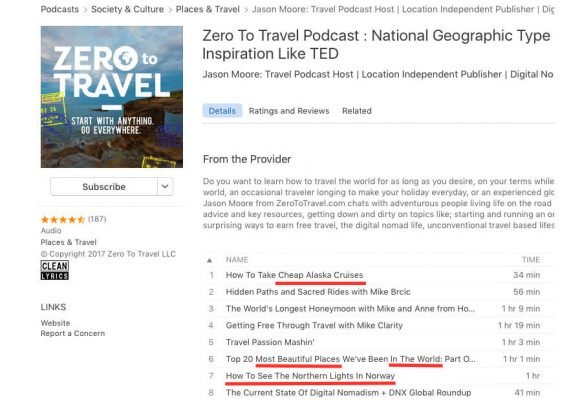
Podcasts can also be a good source of inspiration!
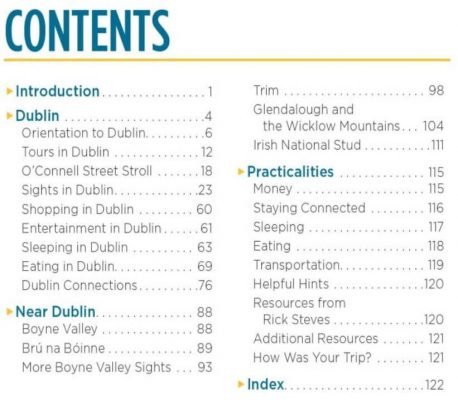
…Or Amazon.
Understand the Metrics Behind Your Target Keywords
Most people focus entirely on two metrics when doing keyword research:
- Search volume (average monthly searches)
- Keyword difficulty (estimated how easy or hard it will be to appear on the first page of search results for that term).
This is very important because they provide useful insights into the keyword’s potential and its ranking difficulty.
However, instead of just looking at search volume, you should try to figure out the actual search traffic potential for each keyword. That way, you can focus your efforts on ranking for words that are likely to send the most targeted traffic your way.
In Ahrefs, you can do this by looking at the traffic statistics for the current top-ranking pages in the SERP Overview report of Ahrefs Keywords Explorer:
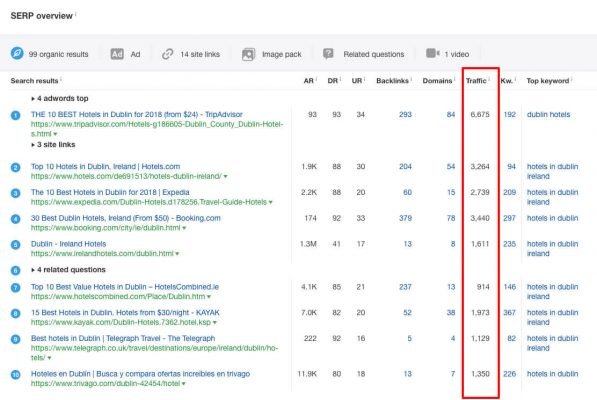
This tells you the estimated monthly search traffic for each top-ranking page.
You can also see that these pages (ranking for Dublin hotels) also rank for many other related keywords. Looking at these statistics gives you an idea of what kind of traffic you can expect to drive to your page if you’re looking to improve your ranking.
Note that the actual traffic potential may exceed the search volume of the keyword you’re researching.
Learn More About Keyword Research
Keyword research is an essential aspect of SEO, and it can be intimidating for newcomers to the field. However, understanding the basic concepts and metrics is mandatory for any website owner who wants to get organic traffic.
To dive deeper into professional keyword research, check out our expanded guide on this topic.
After you figure out the keywords you want to rank for and what searchers will see when they type them into Google, you need to assign those keywords to pages on your website. It’s worth creating a map (in a spreadsheet or other file) linking each keyword in your plan to a page on your website.
STEP 2: Create Search-Optimized Pages
Keyword research is just the first step to attracting more organic search traffic.
You also need to ensure your pages are well-structured and satisfy searchers to rank for the keywords you’ve chosen.
Your optimization efforts should start by ensuring that your visitors are enjoying the user experience (UX) that your website provides. Use design and typography that makes content easy to read and remove any unnecessary elements like pop-ups, opt-in boxes, etc. that may annoy your readers.
On-page optimization is the next step in your SEO strategy.
Even targeting the most profitable keywords with the “best” content won’t help you if your pages aren’t optimized for search engines.
There are many ways to implement the features I’ll discuss in the following sections, but if you use WordPress for your website, I first recommend installing an SEO plugin like Yoast SEO. It’s free to use and fairly simple to operate, and it’s perfect for those new to on-page SEO.
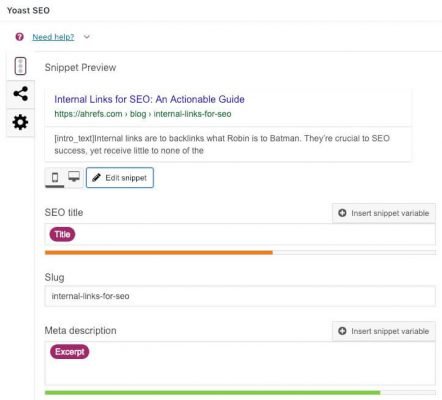 Successfully setting up your pages for search engines includes the following:
Create Content That Matches “Search Intent”
Wanting to rank for a keyword doesn’t mean you can achieve it, even if all the traditional on-page SEO factors are done correctly. This happens because of something called search intent.
In short, there are three main “types” of searches that people perform:
- Navigational: They’re looking for a specific website, e.g., “Dublin Airport”
- Informational: They really want to learn more about a specific topic, e.g., things to do in Dublin
- Transactional: They may be looking to buy a specific product/service, e.g., “book a hotel in Dublin”
Naturally, searches with high commercial interest are more valuable from a business perspective because the people performing them have a greater need to buy and are therefore more likely to spend money if they visit your website.
But search intent isn’t always clear from the search query itself.
For example, take the query best hotels in Dublin.
Now, you might think that my hotel is the best hotel in Dublin, so this is probably a transactional term that I could rank my homepage for, right? Don’t jump to conclusions too quickly.
The best way to understand the intent behind any search term is to look at which pages already rank for it.
So, let’s do that:
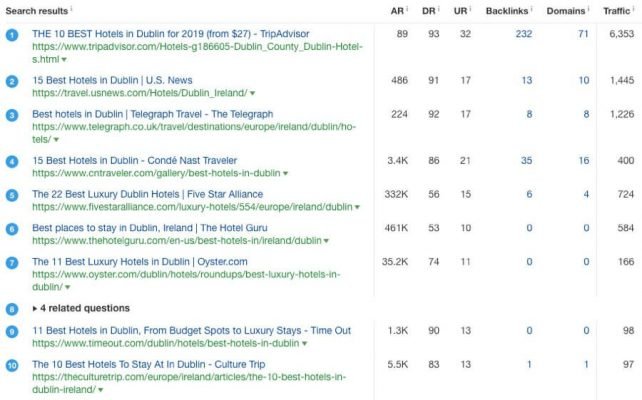
Here, you can see that almost all of the top-ranking results are blog posts and listicle articles.
The logic here is that since Google’s main goal is to satisfy users, their algorithm closely tracks the behavior of people searching for a specific term and tries to deliver results that will meet their search intent. Therefore, you can infer search intent by looking at the similarities between the current top-ranking pages.
Never create content without understanding the search intent behind the query you’re targeting.
Use Short, Descriptive URLs
Your page’s web address will send signals to search engines about its topic. So, you should get this right from the first time to avoid changing it later, if possible.
Here’s Google’s advice on URLs:
Your website’s URL structure should be as simple as possible. Consider organizing your content so that URLs are constructed logically and in a way that is most understandable to humans (when possible, use readable words rather than long ID numbers).
In other words, don’t create URL styles like this:
domain.com/56945602_86587356.asp
When you can describe something like:
domain.com/dublin-guide
Another benefit of descriptive URLs is that they usually include your target keyword (or at least those words and phrases). That said, keywords shouldn’t make the URL look unnatural.
Create Compelling Title Tags and Meta Descriptions
Websites have two specific features that search engines use when building search results:
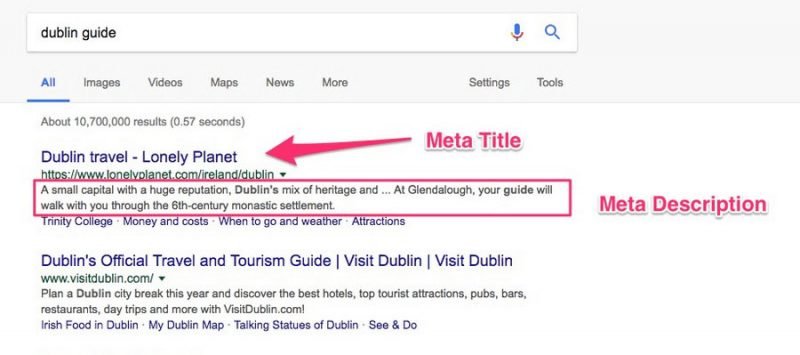
Contrary to what it might seem, the meta title tag doesn’t appear anywhere on your page. It’s just a way to set the name of the browser tab that Google and other search engines use when displaying the page in search results.
SIDENOTE. Google doesn’t always care about the title tags you set. Sometimes they choose to display something slightly different.
The title tag is a great opportunity to write your article:
- Include the keyword you want the page to rank for
- Compelling enough to make searchers click and visit your website.
It would be wise, so we recommend keeping it under 60 characters to avoid having the content completely truncated in search results. However, it’s not so much about the number of characters as it is about pixels. Therefore, a good idea is to use a SERP pixel tool to ensure your titles aren’t truncated.
Meta descriptions are also very important, mainly because they can also affect click-through rates.
SIDENOTE. Click-through rate is not considered a direct ranking factor, but it directly affects the amount of traffic you receive from search.
If you want to avoid the risk of truncation, your meta descriptions should not exceed ~155 characters. Use the pixel tool mentioned above to keep them within limits.
Recommended reading: How to Create the Perfect SEO Title Tag (Our 4-Step Process)
Use Headings and Subheadings to Create a Logical Structure
Use standard HTML formatting for headings (H1 to H6) to help search engines easily understand your page structure and the importance of each section.
Heading 1 should be reserved for the on-page title of your content and ideally include the primary keyword (or something closely related to the primary keyword) you’re targeting. You can have multiple H1 tags per page, but we recommend using just one.
Heading 2 should be used for the headings of the main sections on your page. They should also include the primary keyword you’re targeting (whenever possible and most natural, don’t force it!) and are a good place to add longer-tail keywords you want to rank for.
Every time you go one step deeper into your content, use the next heading type, e.g., Heading 3 for subheadings within an H2 section, etc.
Here’s what a well-structured piece of content would look like:
H1: Complete Guide for First-Time Travelers to Dublin
H2: Attractions & Sights
H3: Trinity College
H4: Book of Kells Exhibition & Old Library
H3: Guinness Storehouse
H4: Gravity Bar
H3: Temple Bar Area
H2: Accommodation
H3: Hotel 1
H3: Hotel 2
H3: Hotel 3
H2: Restaurants
H3: Fine Dining
H3: Gastropubs
H3: Another Place
H2: Bars
H3: Bars with Live Music
H3: Bars with Great Cocktails
H3: Very Touristy Bar
H2: Conclusion
With a clear and complete structure, it makes it easy for search engines to categorize your content and also helps readers understand better.
Optimize Your Images
Images are great for humans, but search engines may have trouble making sense of them.
To illustrate this, here’s what happens when you upload a butter photo to Google’s Cloud Vision API, an image recognition tool:
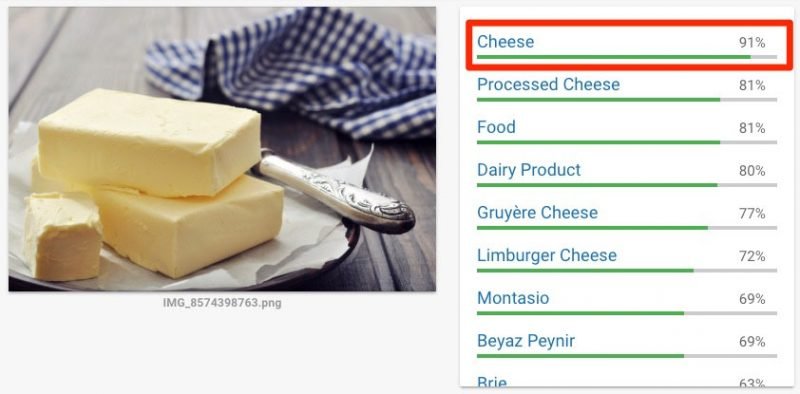
Google is 91% sure this is an image of cheese, which is wrong.
To help Google (and other search engines) understand your images, you should use alt tags to describe and explain them. In this case, a good alt tag would be alt=”Butter”
In WordPress, editing the alt tag is done using the Alternative Text field in the image editor:
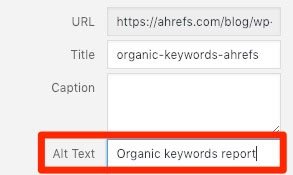
If you’re not using WordPress, you can also add the tag manually:

Set Up Schema
Schema has become a popular way to improve how your website appears in search results. For example, you can use it to add ratings to your search result entry, making it more noticeable:

To start using Schema, you should check out the official documentation on these tools that allow you to create and test structured data.
Learn More About On-Page SEO
On-page SEO is quite complex. Everything above will help you get started more easily, but there’s always more to learn (as is the case with everything related to SEO)
Check out our complete guide to on-page SEO to learn more.
STEP 3: Ensure Your Website Is Accessible to Both Search Engines and Humans
When doing SEO, it’s important to remember that you’re working for two separate clients — readers and the search engine bots used to index your website.
While bots are becoming smarter and more human-like, many differences still exist between the two types. Therefore, your goal is to create a positive experience for both humans and bots.
Understanding how to create pages optimized for bots can be a challenge for you. That’s why, while it’s very important to understand the features we discuss in the following sections, I encourage you to delegate this to an expert (preferably developers).
However, here are a few tips to help you implement your goals more easily.
NOTE. I’ll keep this section relatively short and simple, as I don’t want to get bogged down with too many technical elements in this guide.
Ensure Your Website Loads Fast
Both humans and search engines prioritize page load speed. Studies show that up to 40% of people leave websites if they take more than 3 seconds to load.
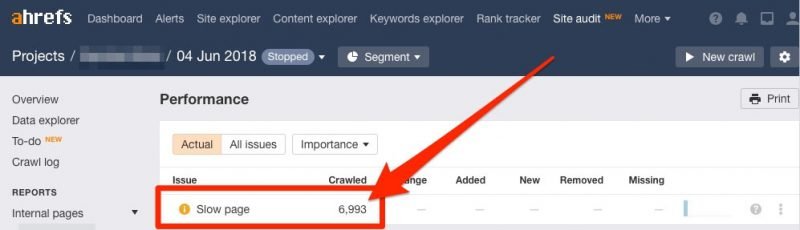
Using Google’s PageSpeed Insights or GTMetrix tools can help you find out how fast your pages load and give you advice on how to improve their speed.
If you want to analyze all pages on your website at once, run a crawl in Ahrefs Site Audit and check the Performance report to see which pages need further speed optimization.
Ensure Your Website Is Mobile-Friendly
According to a study, over 60% of searches are now from mobile devices.
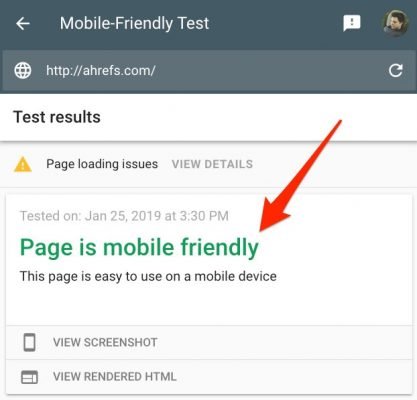
Use Google’s Mobile-Friendly Test tool to ensure your website is mobile-friendly. Here’s what you want to see:
Install an SSL Certificate
HTTPS has officially become one of the ranking signals that Google uses.
You can tell when a website uses SSL because there will be a padlock in the URL bar:

Not using an SSL certificate can also cause some security issues, especially if you’re running an e-commerce website or accepting form submissions.
Free options like Let’s Encrypt allow you to secure your website without breaking your budget.
Create a Sitemap
A sitemap is an XML file that lists all the pages on your website. Search engines use it to find your content and understand how your pages are connected (i.e., to see your website’s overall structure).
If you use Yoast SEO plugin, the plugin will create a sitemap for you. Then, you can follow Google’s guide on how to check and submit it. (There are also many other free tools you can use to create a sitemap for your website.)
Sitemaps don’t directly affect rankings, but they allow search engines to find and index new pages on your website faster.
Upload a robots.txt File
While the sitemap will provide the full structure of your website, the robots.txt file provides specific instructions to search engine crawlers on parts of the website that they should and should not index.
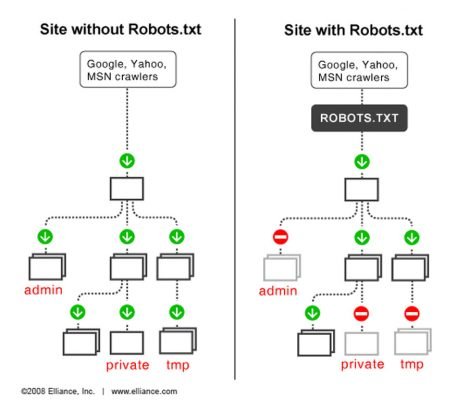
Having a robots.txt file is recommended because search engines will allocate a crawl budget, the number of pages they’ve allowed to crawl with each visit from their bots.
All major search engine crawlers and other good bots can recognize and follow the robots.txt format, including AhrefsBot.
Internal Linking Between Related Articles and Pages
Strategic linking of different pages on your website is a great way to speed up how search engines crawl your website and point to your most important pages.
There are many different strategies for doing this, such as the hub-and-spoke strategy, pillar content, etc. These things can get quite complex. For now, you need to focus on creating a tight structure with many links between related pages.
In our example, we could create a page targeting ‘Dublin guide’ and have links to separate pages covering ‘Dublin sights,’ ‘Dublin restaurants’, etc.
To quickly find linking opportunities, use the following query on Google:
site:yourdomain.com + “topic of the post you want to link to”
For example, if you’re looking to link to your “Dublin guide” query, you could type site:yourdomain.com + “Dublin guide” (or “Dublin tips” or even just “Dublin”) and you’ll see all the pages on your website from which you can add links.
Learn More About Website Structure and Technical SEO
Your website’s data structure plays an important role in achieving successful SEO performance.
STEP 4: Build Backlinks from Other Websites
Link building is crucial for the success of your SEO strategy, so if you’re willing to devote resources (time, money, etc.) to producing content, you should also be prepared to commit quite a bit of time to promoting and creating links to your content.
Why? Because there’s clear evidence that backlinks are one of the most influential factors in Google’s ranking algorithm.
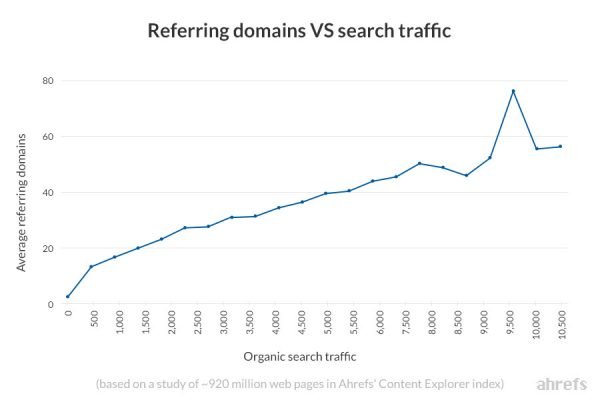
Even Google admits that backlinks are one of their top 3 ranking factors.
There are many tactics you can use to get other websites to link back to yours. Some may be more legitimate than others. However, before you start picking the low-hanging fruit of “link building,” try to take some time to review and analyze how your competitors are building links.
It’s important to leverage your competitors because each niche will be different and tactics that work well in one niche may not work for you.
When doing this, consider some of the following tactics.
Skip Links from Low-Quality Content
Let’s say we’ve published an amazing Dublin travel guide.
We put our heart and soul into this guide. It’s extremely thorough, the user experience is spot-on, and the information and recommendations are constantly updated. It’s probably the best Dublin travel guide on the web.
In other words, our Dublin travel guide deserves more links than any other page.
However, if we search for “Dublin travel” in Content Explorer and filter for pages with links from more than 20 referring domains, here are some results:
“Dublin travel” keyword report on Content ExplorerTwo pages combined have links from over 200 referring domains (unique websites).
Both of those pages are bad. They’re just not as good as the guide we’ve put out. So, it may be worth trying to contact the people linking to those pages to see if there’s any scope for them to link back to us instead.
To find out who’s linking to a page, we can paste the URL into Ahrefs Site Explorer and check the Backlinks report.
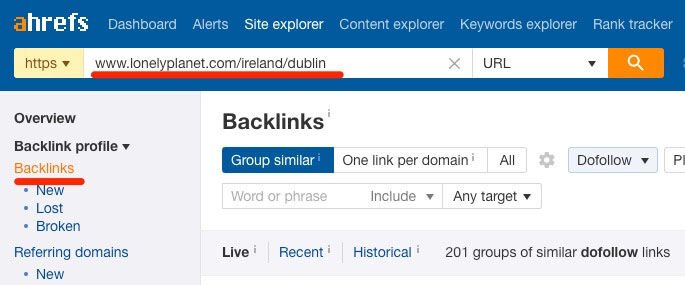
Not every link is worth pursuing, but even after skimming through the backlinks report for just a minute or two, I was able to see a few good candidates that I’d love to get a backlink from.
Here’s one of them:

This page even links to a couple of guides for Dublin and other resources, which makes it more likely that they’ll be willing to add a backlink to our guide page.
All that’s left to do is find the email address of the person responsible for that website and let them know about our content.
Build a Broken Link System
Broken link building is where you find broken relevant pages (with backlinks pointing to them) on other websites. Then you contact the people linking to the dead resource to offer them a suitable replacement on your website.
Sound confusing? Let me show you how to do it.
In this example, I decided to use the Dublin subreddit, mainly because it contains many links and I’m sure there will be at least a few broken links. I run the page through Ahrefs and check the Broken link report:
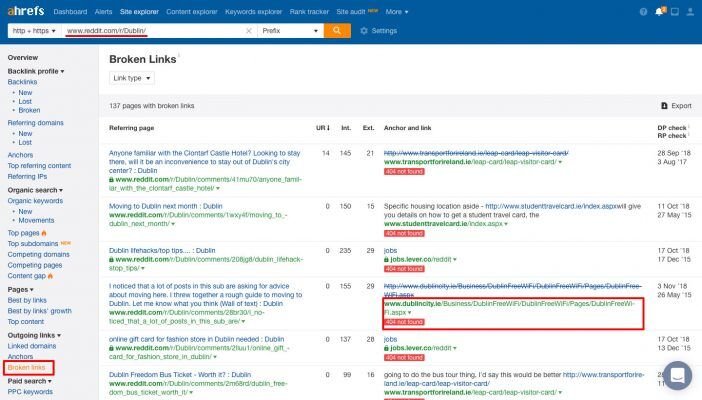
I found one that looks interesting. Based on the text on Reddit, this page contains a map of public WiFi areas in Dublin. You can also use the Wayback Machine to find out what the page used to cover.
Then, I paste the page’s URL into Ahrefs Site Explorer to check if any websites are linking to it:
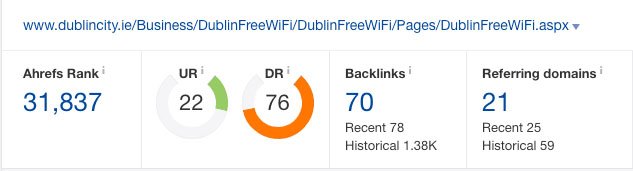
Excellent! Twenty-one websites link to this guide. Ahrefs even makes it easy to find the exact location of the broken link:
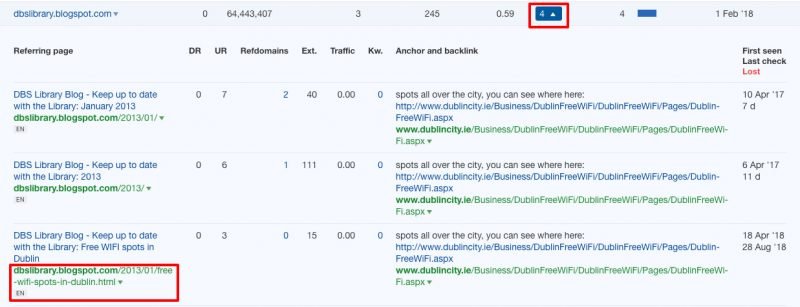
Now I can create a similar page on my website and contact this website owner (and other websites linking to this page) to offer them to replace the dead link with a link to my guide.
The key power of this tactic lies in:
- You know what these website owners want to link to
- You can help improve their website (by fixing broken links)
Guest Blogging
Guest blogging is where you can write for another website in your industry.
Many people think guest blogging became outdated some time ago, when Google published “a warning” about using guest posts to build links.
But read carefully:
Google doesn’t discourage these types of articles, in cases where they inform users, educate another site’s audience, or raise awareness about your career or company. However, what violates Google’s guidelines on link schemes is when the primary purpose is to build links at scale back to the author’s website.
And one of those violations is:
Using or hiring writers who have no knowledge of the topics they write about.
So, as long as your guest post is helpful, informative, and high-quality, you don’t need to worry too much.
Guest blogging works for link building when you follow three basic rules:
- You publish on an authoritative website with a large relevant audience.
- You create a high-quality, useful piece of content for the audience of the website where it’s placed.
- You link to relevant resources on your website that will continue to help the audience expand their knowledge on the topic.
When followed, these turn guest blogging into an excellent tool for building brand, driving referral traffic, and improving rankings. To learn how to use guest blogging and create links at scale, check out Ahrefs’ guide on this topic.
STEP 5: Track Your SEO Success
The final step in setting up your SEO strategy is figuring out how you’ll track your performance. There are many methods and metrics you can use, so it’s easy to get confused.
My advice is this: focus on the basics.
The most important metrics when it comes to SEO are one, organic traffic, and two, average ranking position for the keywords you’re targeting.
Measure Organic Traffic to Your Site
If you use Google Analytics, you can quickly see your organic traffic by going to:
Acquisition > All Traffic > Channels > Organic Search
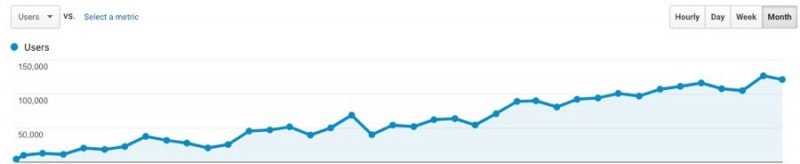
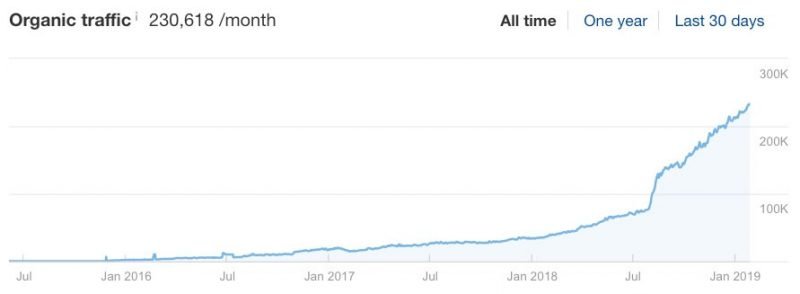
You can also use Ahrefs Site Explorer to track organic traffic along with the number of keywords your website is ranking for, organic positions for different keywords, and more.
Track Your Rankings
Another important thing you should measure in your SEO strategy is how your content ranks on Google over time.
One way to do this is by using Google Search Console, where you can find data about average position, impressions, and clicks you receive for different keywords.
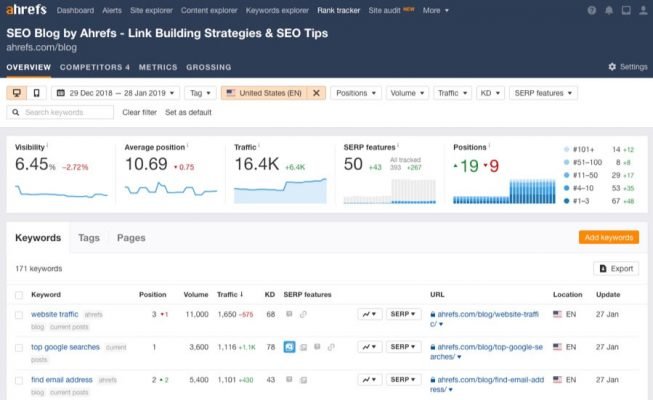
Alternatively, you can also use Ahrefs Rank Tracker for this purpose. It allows you to track up to 10,000 keywords, see rankings improving (or declining) over time, and compare with competitors.
Ahrefs Rank Tracker page report
Final Conclusion
Search engine optimization (SEO) can be very competitive, but it’s still by far the most effective way to drive sustainable traffic to your website.
Furthermore, the efforts you put into optimizing your website boost search traffic incrementally over time, helping you get even more traffic as long as you have the right SEO strategy.
To achieve this, remember to follow the five steps of good basic SEO:
- Find relevant keywords with good search traffic potential
- Create and optimize pages for search engines and users alike
- Ensure your website is accessible to both bots and humans
- Build relevant links from other high-quality websites
- Track what matters
Over time, this process will help you build authority for your website and you’ll be able to rank for more competitive keywords with higher search volumes.
If you think I’ve missed some other important basics in search engine optimization, please let me know in the comments section!


